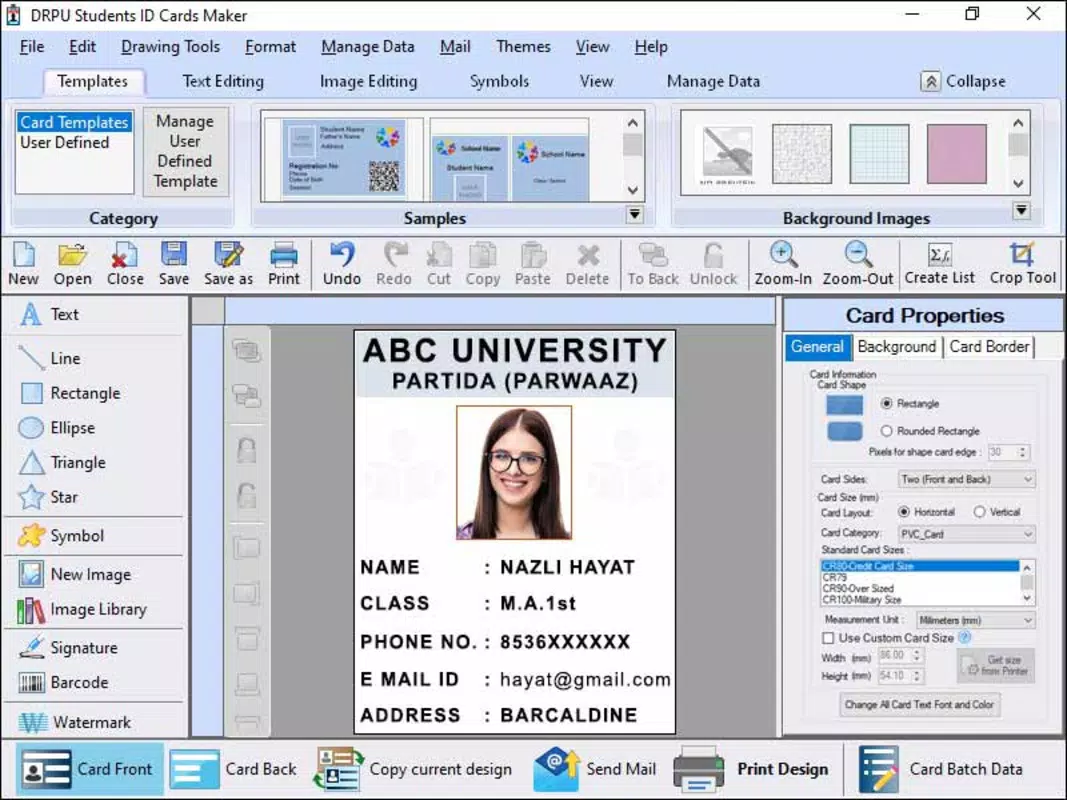

Download Student Identity Card Generating Program – student ID card, generate student ID, ID card maker, student card, digital ID card
Overview
The Student Identity Card Generating Program is a mobile application designed to assist students in creating professional, personalized identity cards using their own information. The app serves as a digital tool for generating student ID cards quickly and efficiently, ideal for school events, campus activities, or personal record-keeping. It addresses the need for accessible, customizable ID solutions without requiring design expertise or external software. Target users include high school and university students, as well as educators and school administrators seeking to streamline student identification processes.
Developed by A. H. Software, the app operates as a straightforward utility within the education category.
It enables users to input essential details such as name, student ID number, photo, course, and institution, then assemble them into a formatted ID card. The resulting digital card can be saved, shared, or printed for physical use. This functionality supports both informal and formal student identification needs, offering a practical alternative to traditional ID card issuance systems.
Within the broader app ecosystem, the Student Identity Card Generating Program fills a niche in the productivity and utility space, particularly for academic environments. It enhances accessibility by allowing students to generate official-looking ID cards anytime, anywhere, directly from their smartphones. Although the developer did not provide additional technical details, the app’s focused scope suggests a lightweight, user-friendly design aimed at simplicity and efficiency. Its free availability further increases its accessibility, making it a valuable tool for students across various educational levels.
Key Features & Functionality
- Customizable ID Templates – Users can choose from a selection of pre-designed templates that match common student ID formats, allowing for consistent and professional-looking results.
- Personal Information Input – The app enables users to enter core details such as full name, student ID number, course of study, and institution name, ensuring accurate identification.
- Photo Integration – A built-in feature allows users to upload or capture a photo directly from their device’s camera, ensuring the ID card reflects the user’s current appearance.
- Export and Save Options – Generated ID cards can be saved in standard image formats (e.g., PNG or JPEG) for easy sharing via messaging apps or cloud storage.
- Print-Ready Output – The app produces high-resolution files suitable for printing on standard paper or cardstock, supporting both home and school-based printing needs.
For example, a university freshman can use the app to generate a digital ID card before classes begin, using their enrollment details and a recent photo. This card can then be shared with campus clubs or used during orientation events. Similarly, a high school student preparing for a school trip may create a temporary ID card for identification purposes, avoiding the need to wait for official issuance. The app’s functionality supports real-world scenarios where quick, reliable identification is required, without dependency on school administrative systems.
Interface, UX & Performance
The interface of the Student Identity Card Generating Program is designed with simplicity in mind, featuring a clean layout that prioritizes ease of navigation. Users are guided through a step-by-step process: selecting a template, entering personal data, uploading a photo, and previewing the final ID card. The visual style is minimalistic, focusing on functionality rather than decorative elements, which helps reduce cognitive load and supports faster task completion.
Navigation is intuitive, with clearly labeled buttons and a logical flow from one stage to the next. The app maintains consistency across screens, minimizing confusion and supporting users with varying levels of digital literacy. Although the developer did not list formal performance metrics, the app’s 12.3 MB file size suggests a lightweight footprint, which typically correlates with efficient memory usage and fast load times on a wide range of Android devices.
Responsiveness appears to be well-optimized, with smooth transitions between steps and minimal lag during photo upload and template selection. Stability is likely maintained through a focused feature set, reducing the risk of crashes or unexpected behavior. Users can expect consistent performance across mid-range and high-end Android smartphones, though specific requirements were not disclosed. The app’s performance on older devices remains uncertain due to the lack of formal compatibility information.
Platform Compatibility & Technical Requirements
The Student Identity Card Generating Program is available exclusively on the Android platform. It is compatible with devices running Android OS, though specific version requirements were not listed by the developer. The app has a file size of 12.3 MB, which is relatively small and indicates efficient code optimization and minimal resource demands.
Given its lightweight nature, the app is likely to function smoothly on a broad range of Android devices, including budget and mid-tier smartphones. However, the developer did not specify minimum OS requirements, so compatibility with older Android versions cannot be confirmed. Users are advised to ensure their device meets general Android standards for app installation, particularly regarding storage and processing capabilities.
Updates to the app may be released to improve functionality, fix bugs, or enhance compatibility, though no information was provided on update frequency or release schedule. The app remains free to download and use, which increases its appeal to students and educational institutions with limited budgets.
Pros and Cons
Pros
- Free to download and use, making it accessible to students across different economic backgrounds.
- Lightweight design with a small file size (12.3 MB), ensuring fast installation and minimal storage usage.
- Simple, intuitive interface suitable for users with limited technical experience.
- Supports offline functionality, allowing users to generate ID cards without an internet connection.
- Offers print-ready output, enabling physical use of generated cards.
Cons
- Specific system requirements were not disclosed, which may affect compatibility on older or less common devices.
- No cloud sync or backup feature is available, meaning users must manually save and manage their ID card files.
- Limited customization options beyond basic fields and templates may restrict advanced design preferences.
- App does not support multi-language input, which may limit accessibility for non-English speakers.
- Developer did not provide information on future updates or long-term support plans.
FAQ
Is the Student Identity Card Generating Program safe to install?
The app is available through official Android channels and does not require special permissions beyond basic storage and camera access. As it is free and developed by a known entity, A. H. Software, it is considered secure for general use.
Can I use the generated ID card for official purposes?
The app produces a digital ID card that resembles a standard student ID. While it may be used for informal or internal school purposes, it is not officially recognized as a government or institutional ID. Users should consult their school or institution for official identification requirements.
Does the app require an internet connection?
No, the app functions fully offline. Users can generate and save ID cards without needing an internet connection, which is beneficial in areas with limited connectivity.
How do I update the app?
Updates are automatically available through the Android app store when new versions are released. Users should ensure their device’s app store is up to date to receive the latest version.
Is my data stored on external servers?
No, all data entered into the app is processed locally on the user’s device. The app does not upload or share personal information with external servers, ensuring user privacy.
Final Thoughts
The Student Identity Card Generating Program offers a practical, no-frills solution for students and educators seeking to create professional-looking ID cards quickly and affordably. Its focus on simplicity, low resource usage, and offline functionality makes it a reliable tool for daily academic use. While it lacks advanced customization and cloud features, its core purpose is fulfilled with precision and efficiency.
Students who need a temporary or personal ID for events, clubs, or travel will benefit most from this app. Its free model and lightweight design further enhance its value, especially in educational settings where budget and technical constraints are common. For anyone looking to generate a digital student ID card on the go, this app delivers real utility without unnecessary complexity.
Download Student Identity Card Generating Program now


